> ## Documentation Index
> Fetch the complete documentation index at: https://docs.vms.verolabs.co/llms.txt
> Use this file to discover all available pages before exploring further.
# Setup guideline VMS master
> Prepare, deploy, and verify the VMS master on Kubernetes
The VMS master is the central control plane for Vero Monitor Service.
**Operating System Requirement**: The VMS Master runs on Kubernetes (K3s) and **only supports the Linux operating system** (Ubuntu, CentOS, RHEL, Debian). Trialling or installing the Master on Windows is not supported.
## Master Architecture on K3s (Linux)
Below is the conceptual architecture of the VMS Master components running on a Linux K3s cluster:
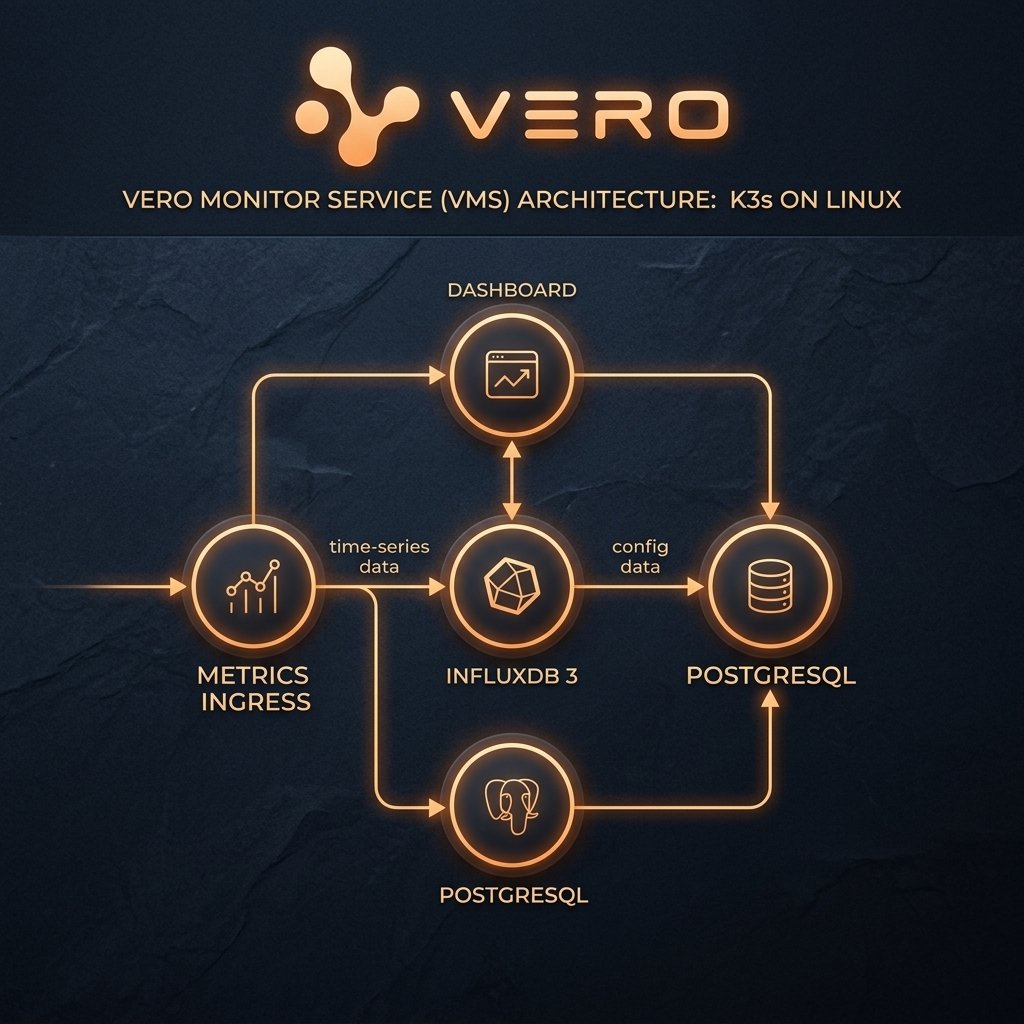 | Component | Kubernetes Object | Role |
| --------------------- | -------------------------------- | ------------------------------------------------------------------- |
| `postgres-internal` | Deployment, Service, PVC, Secret | Catalog DB, stores agent/probe configurations, auth, and metadata |
| `postgrest` | Deployment, Service | Internal REST API layer for dashboard and services to read catalogs |
| `influxdb3` | Deployment, Service, PVC, Secret | Stores time-series metrics and logs (`vms_timeseries`, `vms_logs`) |
| `vms-metrics-ingress` | Deployment, Service, Ingress | Handles metric ingestion and serves configuration files to agents |
| `vms-dashboard` | Deployment, Service, Ingress | Web UI Dashboard for operations and administration |
| `vms-checker-svc` | Deployment, Service | Conducts active readiness and dependency health checks |
| `vms-synthetic-svc` | Deployment, Service | Runs preconfigured synthetic user flows |
| `vms-alert-agent` | Deployment | Evaluates alert rules and routes alerts |
***
## Prerequisites (Master)
| Prerequisite | Description |
| ------------ | ---------------------------------------------------------------------------------------- |
| OS | **Linux** (Ubuntu 22.04 LTS or RHEL 9+ recommended) |
| K3s / K8s | Kubernetes cluster with a default StorageClass configured |
| Domain | Domain pointing to the K3s server (e.g., `vms.verolabs.co` and `ingest.vms.verolabs.co`) |
| GitOps Repo | Clone repository `vms-gitops` to your deployment server |
***
## Deployment Flow (Step - Check - Result)
The VMS Master stack is fully packaged and automated via **Kustomize**. You can deploy the whole stack in a single command or apply layers in sequence:
* **Step**: Create the `vms` namespace and apply the bootstrap layer to automatically generate TLS certs, Influx tokens, and agent service keys.
```bash theme={null}
kubectl apply -f namespace.yaml
kubectl apply -k bootstrap
```
* **Check**: Monitor the bootstrap job and secrets status:
```bash theme={null}
kubectl get job vms-bootstrap -n vms
kubectl get secrets -n vms
```
* **Result**: The `vms-bootstrap` job ends with status `Completed`. Secrets `vms-metrics-ingress-secret` and `influxdb3-secret` are created.
* **Step**: Deploy PostgreSQL and InfluxDB 3 databases. The system automatically launches schema initialization and database provisioning jobs (`vms-pg-schema-load` and `influxdb3-create-db`).
```bash theme={null}
kubectl apply -k infra
```
* **Check**: Verify database pods are running and setup jobs completed:
```bash theme={null}
kubectl get pods -n vms -l app.kubernetes.io/part-of=vms-data-plane
kubectl get jobs -n vms -l app=vms-pg-schema-load
kubectl get jobs -n vms -l app=influxdb3-create-db
```
* **Result**: `postgres-internal` and `influxdb3` pods show `Running` (1/1). Database setup and schema load jobs show `Completed`.
* **Step**: Apply core VMS services (Ingress, Dashboard, Checker, Synthetic, Alert). Pod migrations are executed automatically during start-up.
```bash theme={null}
kubectl apply -k services/metrics-ingress
kubectl apply -k services/dashboard
kubectl apply -k services/checker-svc
kubectl apply -k services/synthetic-svc
kubectl apply -k services/alert-agent
```
*(Or deploy the whole stack in one command: `kubectl apply -k .` from root)*
* **Check**: Verify service readiness and test the HTTPS Ingress endpoint:
```bash theme={null}
kubectl wait --for=condition=Ready pod -l app=vms-metrics-ingress -n vms --timeout=120s
curl -k https://ingest.vms.verolabs.co/healthz
```
* **Result**: All pods display `Running`. The curl request returns `200 OK` with JSON `{"status":"healthy"}`.
* **Step**: Extract the auto-minted service API key from the secret:
```bash theme={null}
kubectl get secret vms-ingest-svc-key -n vms -o jsonpath='{.data.apikey}' | base64 -d
```
*Note: If you need to generate separate custom keys for specific agents, configure and run `services/metrics-ingress/create-key-job.yaml`.*
* **Check**: Verify the printed string is a random key hash.
* **Result**: The secure agent key `vms_agent_...` is printed. Save it to configure VMS Agent connections.
***
## Acceptance Criteria
### 1. Success Criteria
* All pods in the `vms` namespace show `Running` or `Completed`.
* Ingress resolves with valid SSL Certs (no client certificate or x509 validation errors).
* Dashboard is accessible and operators can log in.
### 2. Failure Signals & Troubleshooting
* **Pod is `Pending`**: Indicates resource constraints or storage volume mounting failures.
* *Fix*: Run `kubectl describe pod -n vms` to inspect.
* **Pod displays `CrashLoopBackOff`**: Caused by bad configuration, missing secrets, or database connection refusals.
* *Fix*: Check the previous logs with `kubectl logs -n vms --previous`.
* **`401 Unauthorized` errors**: Mismatched or non-existent API keys.
* *Fix*: Re-run the key generator and ensure the database auth entries are correct.
| Component | Kubernetes Object | Role |
| --------------------- | -------------------------------- | ------------------------------------------------------------------- |
| `postgres-internal` | Deployment, Service, PVC, Secret | Catalog DB, stores agent/probe configurations, auth, and metadata |
| `postgrest` | Deployment, Service | Internal REST API layer for dashboard and services to read catalogs |
| `influxdb3` | Deployment, Service, PVC, Secret | Stores time-series metrics and logs (`vms_timeseries`, `vms_logs`) |
| `vms-metrics-ingress` | Deployment, Service, Ingress | Handles metric ingestion and serves configuration files to agents |
| `vms-dashboard` | Deployment, Service, Ingress | Web UI Dashboard for operations and administration |
| `vms-checker-svc` | Deployment, Service | Conducts active readiness and dependency health checks |
| `vms-synthetic-svc` | Deployment, Service | Runs preconfigured synthetic user flows |
| `vms-alert-agent` | Deployment | Evaluates alert rules and routes alerts |
***
## Prerequisites (Master)
| Prerequisite | Description |
| ------------ | ---------------------------------------------------------------------------------------- |
| OS | **Linux** (Ubuntu 22.04 LTS or RHEL 9+ recommended) |
| K3s / K8s | Kubernetes cluster with a default StorageClass configured |
| Domain | Domain pointing to the K3s server (e.g., `vms.verolabs.co` and `ingest.vms.verolabs.co`) |
| GitOps Repo | Clone repository `vms-gitops` to your deployment server |
***
## Deployment Flow (Step - Check - Result)
The VMS Master stack is fully packaged and automated via **Kustomize**. You can deploy the whole stack in a single command or apply layers in sequence:
* **Step**: Create the `vms` namespace and apply the bootstrap layer to automatically generate TLS certs, Influx tokens, and agent service keys.
```bash theme={null}
kubectl apply -f namespace.yaml
kubectl apply -k bootstrap
```
* **Check**: Monitor the bootstrap job and secrets status:
```bash theme={null}
kubectl get job vms-bootstrap -n vms
kubectl get secrets -n vms
```
* **Result**: The `vms-bootstrap` job ends with status `Completed`. Secrets `vms-metrics-ingress-secret` and `influxdb3-secret` are created.
* **Step**: Deploy PostgreSQL and InfluxDB 3 databases. The system automatically launches schema initialization and database provisioning jobs (`vms-pg-schema-load` and `influxdb3-create-db`).
```bash theme={null}
kubectl apply -k infra
```
* **Check**: Verify database pods are running and setup jobs completed:
```bash theme={null}
kubectl get pods -n vms -l app.kubernetes.io/part-of=vms-data-plane
kubectl get jobs -n vms -l app=vms-pg-schema-load
kubectl get jobs -n vms -l app=influxdb3-create-db
```
* **Result**: `postgres-internal` and `influxdb3` pods show `Running` (1/1). Database setup and schema load jobs show `Completed`.
* **Step**: Apply core VMS services (Ingress, Dashboard, Checker, Synthetic, Alert). Pod migrations are executed automatically during start-up.
```bash theme={null}
kubectl apply -k services/metrics-ingress
kubectl apply -k services/dashboard
kubectl apply -k services/checker-svc
kubectl apply -k services/synthetic-svc
kubectl apply -k services/alert-agent
```
*(Or deploy the whole stack in one command: `kubectl apply -k .` from root)*
* **Check**: Verify service readiness and test the HTTPS Ingress endpoint:
```bash theme={null}
kubectl wait --for=condition=Ready pod -l app=vms-metrics-ingress -n vms --timeout=120s
curl -k https://ingest.vms.verolabs.co/healthz
```
* **Result**: All pods display `Running`. The curl request returns `200 OK` with JSON `{"status":"healthy"}`.
* **Step**: Extract the auto-minted service API key from the secret:
```bash theme={null}
kubectl get secret vms-ingest-svc-key -n vms -o jsonpath='{.data.apikey}' | base64 -d
```
*Note: If you need to generate separate custom keys for specific agents, configure and run `services/metrics-ingress/create-key-job.yaml`.*
* **Check**: Verify the printed string is a random key hash.
* **Result**: The secure agent key `vms_agent_...` is printed. Save it to configure VMS Agent connections.
***
## Acceptance Criteria
### 1. Success Criteria
* All pods in the `vms` namespace show `Running` or `Completed`.
* Ingress resolves with valid SSL Certs (no client certificate or x509 validation errors).
* Dashboard is accessible and operators can log in.
### 2. Failure Signals & Troubleshooting
* **Pod is `Pending`**: Indicates resource constraints or storage volume mounting failures.
* *Fix*: Run `kubectl describe pod -n vms` to inspect.
* **Pod displays `CrashLoopBackOff`**: Caused by bad configuration, missing secrets, or database connection refusals.
* *Fix*: Check the previous logs with `kubectl logs -n vms --previous`.
* **`401 Unauthorized` errors**: Mismatched or non-existent API keys.
* *Fix*: Re-run the key generator and ensure the database auth entries are correct.