> ## Documentation Index
> Fetch the complete documentation index at: https://docs.vms.verolabs.co/llms.txt
> Use this file to discover all available pages before exploring further.
# Setup guideline VMS master
> Hướng dẫn chuẩn bị, triển khai và kiểm tra VMS master trên Kubernetes
VMS master là control plane trung tâm của Vero Monitor Service.
**Yêu cầu hệ điều hành**: VMS Master chạy trên Kubernetes (K3s) **chỉ hỗ trợ hệ điều hành Linux** (Ubuntu, CentOS, RHEL, Debian). Không hỗ trợ triển khai Master trên Windows.
## Kiến trúc Master trên K3s (Linux)
Dưới đây là mô hình kiến trúc các thành phần của VMS Master khi chạy trên cụm K3s (Linux):
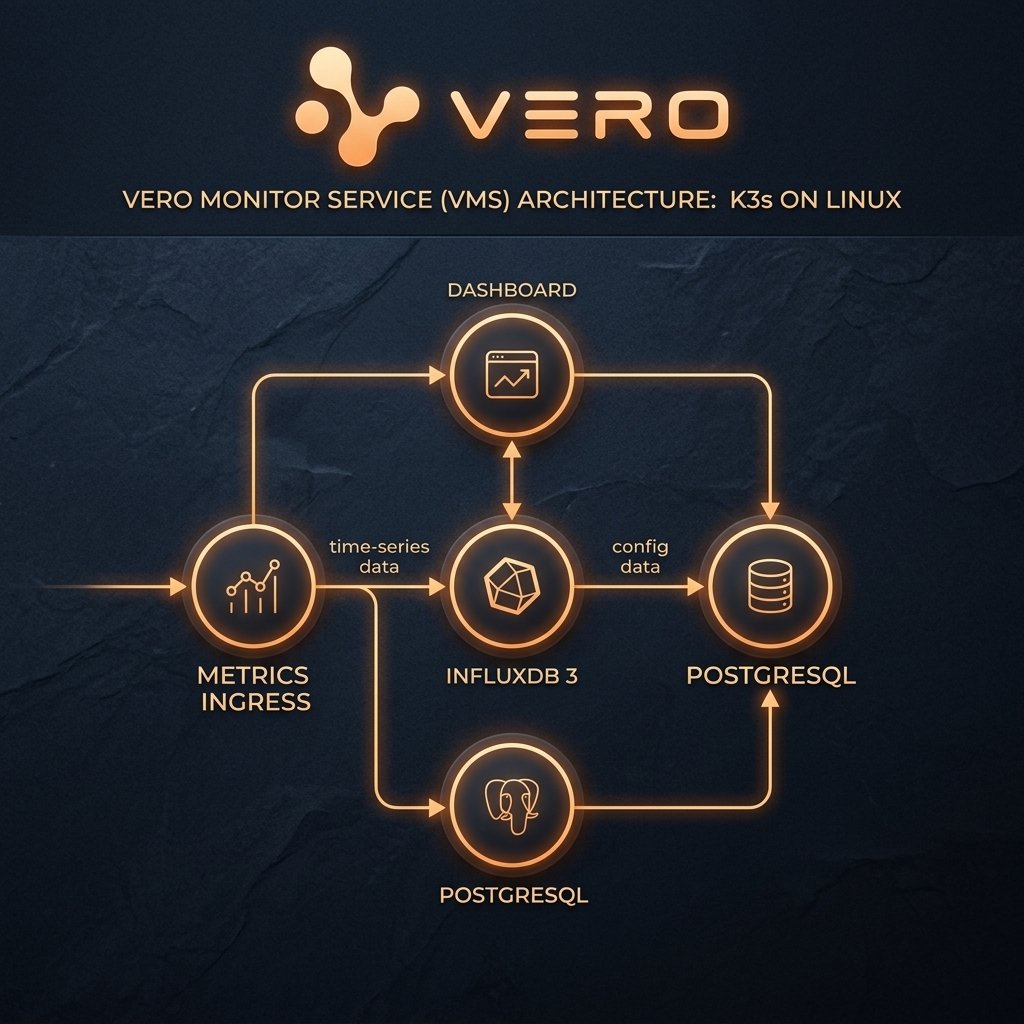 | Thành phần | Kubernetes object | Vai trò |
| --------------------- | -------------------------------- | ------------------------------------------------------------------ |
| `postgres-internal` | Deployment, Service, PVC, Secret | Catalog DB, lưu cấu hình agent/probe, auth và metadata |
| `postgrest` | Deployment, Service | REST API layer để dashboard và các service đọc catalog |
| `influxdb3` | Deployment, Service, PVC, Secret | Lưu trữ time-series metrics và logs (`vms_timeseries`, `vms_logs`) |
| `vms-metrics-ingress` | Deployment, Service, Ingress | API tiếp nhận dữ liệu và cấp cấu hình cho agent |
| `vms-dashboard` | Deployment, Service, Ingress | Giao diện Web UI để vận hành và hiển thị dashboard |
| `vms-checker-svc` | Deployment, Service | Thực hiện readiness/dependency health check |
| `vms-synthetic-svc` | Deployment, Service | Chạy synthetic user flow check |
| `vms-alert-agent` | Deployment | Đánh giá rule cảnh báo và gửi Alert |
***
## Các đầu mục chuẩn bị (Master)
| Đầu mục | Yêu cầu chuẩn bị |
| ----------- | ------------------------------------------------------------------------------- |
| OS | **Linux** (khuyên dùng Ubuntu 22.04 LTS hoặc RHEL 9+) |
| K3s / K8s | Đã cài đặt cụm K3s/Kubernetes, cấu hình StorageClass mặc định |
| Domain | Domain trỏ về server K3s (ví dụ: `vms.verolabs.co` và `ingest.vms.verolabs.co`) |
| GitOps Repo | Clone repository `vms-gitops` về server deploy |
***
## Luồng triển khai Step - Check - Result
Hệ thống VMS Master được đóng gói và tự động hóa toàn bộ qua **Kustomize**. Bạn chỉ cần triển khai một lệnh duy nhất hoặc deploy theo thứ tự các lớp dưới đây:
* **Step**: Áp dụng namespace `vms` và khởi chạy job bootstrap để sinh tự động các secret bảo mật (TLS cert self-signed, Influx token, service keys).
```bash theme={null}
kubectl apply -f namespace.yaml
kubectl apply -k bootstrap
```
* **Check**: Kiểm tra trạng thái của job bootstrap và các secret được tạo ra:
```bash theme={null}
kubectl get job vms-bootstrap -n vms
kubectl get secrets -n vms
```
* **Result**: Job `vms-bootstrap` ở trạng thái `Completed`. Các secret `vms-metrics-ingress-secret` và `influxdb3-secret` đã được sinh tự động.
* **Step**: Triển khai database PostgreSQL và cơ sở dữ liệu time-series InfluxDB 3. Cụm K8s sẽ tự chạy các job khởi tạo database (`influxdb3-create-db`) và tải cấu trúc schema (`vms-pg-schema-load`).
```bash theme={null}
kubectl apply -k infra
```
* **Check**: Đảm bảo các pod dữ liệu đã chạy và các job setup đã hoàn tất:
```bash theme={null}
kubectl get pods -n vms -l app.kubernetes.io/part-of=vms-data-plane
kubectl get jobs -n vms -l app=vms-pg-schema-load
kubectl get jobs -n vms -l app=influxdb3-create-db
```
* **Result**: Pod `postgres-internal` và `influxdb3` ở trạng thái `Running` (1/1). Các job schema-load và create-db báo trạng thái `Completed`.
* **Step**: Triển khai các core service của hệ thống (Ingress, Dashboard, Checker, Synthetic, Alert). Các service này tự động chạy migrations khi start thông qua initContainers.
```bash theme={null}
kubectl apply -k services/metrics-ingress
kubectl apply -k services/dashboard
kubectl apply -k services/checker-svc
kubectl apply -k services/synthetic-svc
kubectl apply -k services/alert-agent
```
*(Hoặc dùng lệnh deploy toàn bộ: `kubectl apply -k .` từ root folder)*
* **Check**: Đợi các pods ở trạng thái sẵn sàng và test Ingress healthcheck:
```bash theme={null}
kubectl wait --for=condition=Ready pod -l app=vms-metrics-ingress -n vms --timeout=120s
curl -k https://ingest.vms.verolabs.co/healthz
```
* **Result**: Tất cả pod ở trạng thái `Running`. Lệnh curl trả về HTTP status `200 OK` kèm `{"status":"healthy"}`.
* **Step**: Lấy ingest key được tự động sinh ra trong phase bootstrap để cấu hình cho VMS Agent.
```bash theme={null}
kubectl get secret vms-ingest-svc-key -n vms -o jsonpath='{.data.apikey}' | base64 -d
```
*Lưu ý: Nếu muốn sinh thêm key mới theo site/agent cụ thể, bạn có thể chỉnh sửa và chạy `services/metrics-ingress/create-key-job.yaml`.*
* **Check**: Verify key có dạng chuỗi string ngẫu nhiên.
* **Result**: In ra terminal key dạng `vms_agent_...`. Lưu lại key này để cấu hình cho client agent.
***
## Tiêu chí Nghiệm thu (Success/Fail Criteria)
### 1. Success Criteria (Thành công)
* Toàn bộ pod trong namespace `vms` ở trạng thái `Running` hoặc `Completed`.
* Ingress HTTPS hoạt động hợp lệ với SSL Certificate được verify (không bị lỗi x509 trên client/agent).
* Có thể login vào Dashboard và thấy danh sách cấu hình rỗng (sẵn sàng kết nối agent).
### 2. Fail Signals & Hướng xử lý nhanh
* **Pod ở trạng thái `Pending`**: Thường do thiếu tài nguyên phần cứng (CPU/RAM) hoặc StorageClass không nhận diện được.
* *Xử lý*: Chạy `kubectl describe pod -n vms` để xem nguyên nhân chi tiết.
* **Pod báo `CrashLoopBackOff`**: Thường do sai biến môi trường, kết nối DB bị từ chối hoặc thiếu quyền đọc secret.
* *Xử lý*: Kiểm tra log lỗi bằng `kubectl logs -n vms --previous`.
* **Lỗi `401 Unauthorized` từ Ingress**: Do truyền sai token hoặc key của agent chưa được map chính xác trên database.
* *Xử lý*: Chạy lại job sinh key và kiểm tra cấu hình biến môi trường của Ingress.
| Thành phần | Kubernetes object | Vai trò |
| --------------------- | -------------------------------- | ------------------------------------------------------------------ |
| `postgres-internal` | Deployment, Service, PVC, Secret | Catalog DB, lưu cấu hình agent/probe, auth và metadata |
| `postgrest` | Deployment, Service | REST API layer để dashboard và các service đọc catalog |
| `influxdb3` | Deployment, Service, PVC, Secret | Lưu trữ time-series metrics và logs (`vms_timeseries`, `vms_logs`) |
| `vms-metrics-ingress` | Deployment, Service, Ingress | API tiếp nhận dữ liệu và cấp cấu hình cho agent |
| `vms-dashboard` | Deployment, Service, Ingress | Giao diện Web UI để vận hành và hiển thị dashboard |
| `vms-checker-svc` | Deployment, Service | Thực hiện readiness/dependency health check |
| `vms-synthetic-svc` | Deployment, Service | Chạy synthetic user flow check |
| `vms-alert-agent` | Deployment | Đánh giá rule cảnh báo và gửi Alert |
***
## Các đầu mục chuẩn bị (Master)
| Đầu mục | Yêu cầu chuẩn bị |
| ----------- | ------------------------------------------------------------------------------- |
| OS | **Linux** (khuyên dùng Ubuntu 22.04 LTS hoặc RHEL 9+) |
| K3s / K8s | Đã cài đặt cụm K3s/Kubernetes, cấu hình StorageClass mặc định |
| Domain | Domain trỏ về server K3s (ví dụ: `vms.verolabs.co` và `ingest.vms.verolabs.co`) |
| GitOps Repo | Clone repository `vms-gitops` về server deploy |
***
## Luồng triển khai Step - Check - Result
Hệ thống VMS Master được đóng gói và tự động hóa toàn bộ qua **Kustomize**. Bạn chỉ cần triển khai một lệnh duy nhất hoặc deploy theo thứ tự các lớp dưới đây:
* **Step**: Áp dụng namespace `vms` và khởi chạy job bootstrap để sinh tự động các secret bảo mật (TLS cert self-signed, Influx token, service keys).
```bash theme={null}
kubectl apply -f namespace.yaml
kubectl apply -k bootstrap
```
* **Check**: Kiểm tra trạng thái của job bootstrap và các secret được tạo ra:
```bash theme={null}
kubectl get job vms-bootstrap -n vms
kubectl get secrets -n vms
```
* **Result**: Job `vms-bootstrap` ở trạng thái `Completed`. Các secret `vms-metrics-ingress-secret` và `influxdb3-secret` đã được sinh tự động.
* **Step**: Triển khai database PostgreSQL và cơ sở dữ liệu time-series InfluxDB 3. Cụm K8s sẽ tự chạy các job khởi tạo database (`influxdb3-create-db`) và tải cấu trúc schema (`vms-pg-schema-load`).
```bash theme={null}
kubectl apply -k infra
```
* **Check**: Đảm bảo các pod dữ liệu đã chạy và các job setup đã hoàn tất:
```bash theme={null}
kubectl get pods -n vms -l app.kubernetes.io/part-of=vms-data-plane
kubectl get jobs -n vms -l app=vms-pg-schema-load
kubectl get jobs -n vms -l app=influxdb3-create-db
```
* **Result**: Pod `postgres-internal` và `influxdb3` ở trạng thái `Running` (1/1). Các job schema-load và create-db báo trạng thái `Completed`.
* **Step**: Triển khai các core service của hệ thống (Ingress, Dashboard, Checker, Synthetic, Alert). Các service này tự động chạy migrations khi start thông qua initContainers.
```bash theme={null}
kubectl apply -k services/metrics-ingress
kubectl apply -k services/dashboard
kubectl apply -k services/checker-svc
kubectl apply -k services/synthetic-svc
kubectl apply -k services/alert-agent
```
*(Hoặc dùng lệnh deploy toàn bộ: `kubectl apply -k .` từ root folder)*
* **Check**: Đợi các pods ở trạng thái sẵn sàng và test Ingress healthcheck:
```bash theme={null}
kubectl wait --for=condition=Ready pod -l app=vms-metrics-ingress -n vms --timeout=120s
curl -k https://ingest.vms.verolabs.co/healthz
```
* **Result**: Tất cả pod ở trạng thái `Running`. Lệnh curl trả về HTTP status `200 OK` kèm `{"status":"healthy"}`.
* **Step**: Lấy ingest key được tự động sinh ra trong phase bootstrap để cấu hình cho VMS Agent.
```bash theme={null}
kubectl get secret vms-ingest-svc-key -n vms -o jsonpath='{.data.apikey}' | base64 -d
```
*Lưu ý: Nếu muốn sinh thêm key mới theo site/agent cụ thể, bạn có thể chỉnh sửa và chạy `services/metrics-ingress/create-key-job.yaml`.*
* **Check**: Verify key có dạng chuỗi string ngẫu nhiên.
* **Result**: In ra terminal key dạng `vms_agent_...`. Lưu lại key này để cấu hình cho client agent.
***
## Tiêu chí Nghiệm thu (Success/Fail Criteria)
### 1. Success Criteria (Thành công)
* Toàn bộ pod trong namespace `vms` ở trạng thái `Running` hoặc `Completed`.
* Ingress HTTPS hoạt động hợp lệ với SSL Certificate được verify (không bị lỗi x509 trên client/agent).
* Có thể login vào Dashboard và thấy danh sách cấu hình rỗng (sẵn sàng kết nối agent).
### 2. Fail Signals & Hướng xử lý nhanh
* **Pod ở trạng thái `Pending`**: Thường do thiếu tài nguyên phần cứng (CPU/RAM) hoặc StorageClass không nhận diện được.
* *Xử lý*: Chạy `kubectl describe pod -n vms` để xem nguyên nhân chi tiết.
* **Pod báo `CrashLoopBackOff`**: Thường do sai biến môi trường, kết nối DB bị từ chối hoặc thiếu quyền đọc secret.
* *Xử lý*: Kiểm tra log lỗi bằng `kubectl logs -n vms --previous`.
* **Lỗi `401 Unauthorized` từ Ingress**: Do truyền sai token hoặc key của agent chưa được map chính xác trên database.
* *Xử lý*: Chạy lại job sinh key và kiểm tra cấu hình biến môi trường của Ingress.