

The VMS master is the central control plane for Vero Monitor Service.
Master Architecture on K3s (Linux)
Below is the conceptual architecture of the VMS Master components running on a Linux K3s cluster: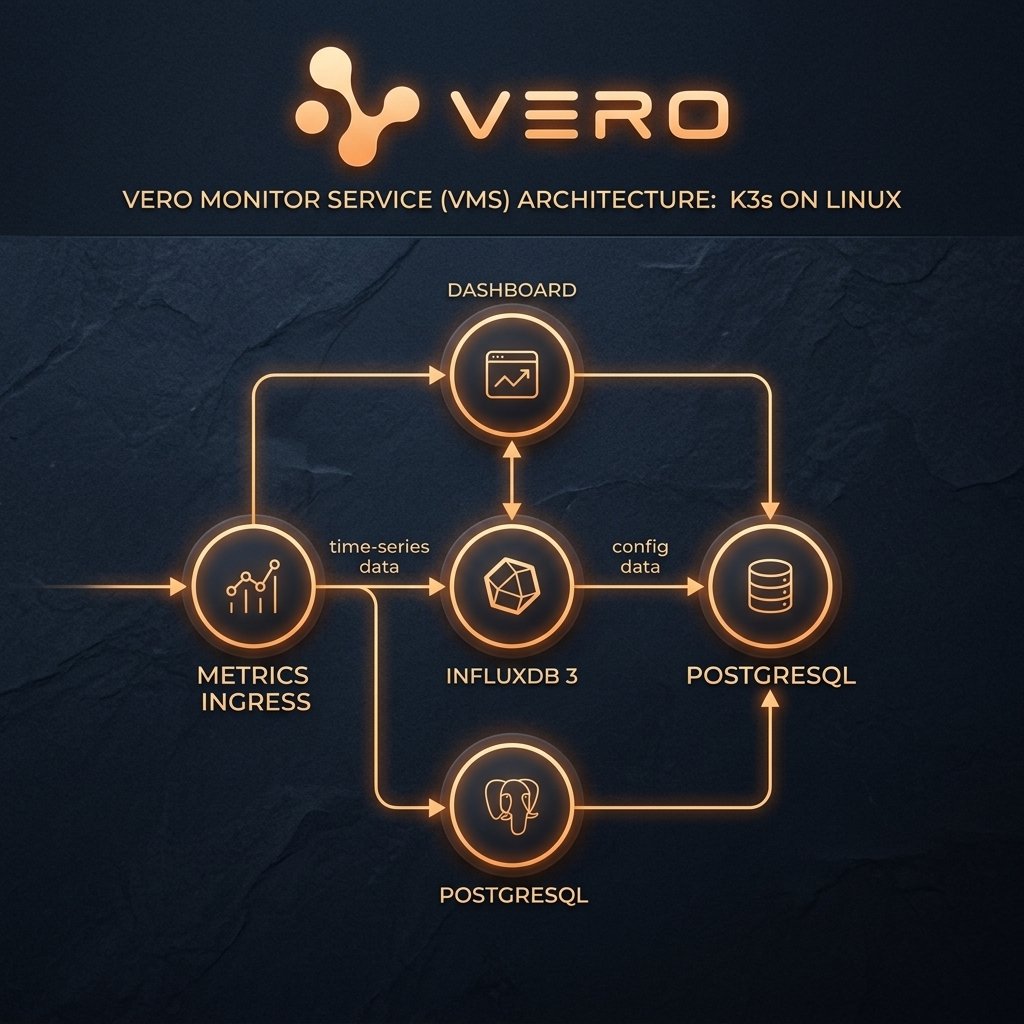
Prerequisites (Master)
Deployment Flow (Step - Check - Result)
The VMS Master stack is fully packaged and automated via Kustomize. You can deploy the whole stack in a single command or apply layers in sequence:1
1. Initialize Namespace and Bootstrap Secrets
- Step: Create the
vmsnamespace and apply the bootstrap layer to automatically generate TLS certs, Influx tokens, and agent service keys. - Check: Monitor the bootstrap job and secrets status:
- Result: The
vms-bootstrapjob ends with statusCompleted. Secretsvms-metrics-ingress-secretandinfluxdb3-secretare created.
2
2. Deploy Data Plane (PostgreSQL & InfluxDB 3)
- Step: Deploy PostgreSQL and InfluxDB 3 databases. The system automatically launches schema initialization and database provisioning jobs (
vms-pg-schema-loadandinfluxdb3-create-db). - Check: Verify database pods are running and setup jobs completed:
- Result:
postgres-internalandinfluxdb3pods showRunning(1/1). Database setup and schema load jobs showCompleted.
3
3. Deploy Core Services and Ingress Routes
- Step: Apply core VMS services (Ingress, Dashboard, Checker, Synthetic, Alert). Pod migrations are executed automatically during start-up.
(Or deploy the whole stack in one command:
kubectl apply -k .from root) - Check: Verify service readiness and test the HTTPS Ingress endpoint:
- Result: All pods display
Running. The curl request returns200 OKwith JSON{"status":"healthy"}.
4
4. Retrieve Agent Ingest API Key
- Step: Extract the auto-minted service API key from the secret:
Note: If you need to generate separate custom keys for specific agents, configure and run
services/metrics-ingress/create-key-job.yaml. - Check: Verify the printed string is a random key hash.
- Result: The secure agent key
vms_agent_...is printed. Save it to configure VMS Agent connections.
Acceptance Criteria
1. Success Criteria
- All pods in the
vmsnamespace showRunningorCompleted. - Ingress resolves with valid SSL Certs (no client certificate or x509 validation errors).
- Dashboard is accessible and operators can log in.
2. Failure Signals & Troubleshooting
- Pod is
Pending: Indicates resource constraints or storage volume mounting failures.- Fix: Run
kubectl describe pod <pod-name> -n vmsto inspect.
- Fix: Run
- Pod displays
CrashLoopBackOff: Caused by bad configuration, missing secrets, or database connection refusals.- Fix: Check the previous logs with
kubectl logs <pod-name> -n vms --previous.
- Fix: Check the previous logs with
401 Unauthorizederrors: Mismatched or non-existent API keys.- Fix: Re-run the key generator and ensure the database auth entries are correct.